
TL;DR
- Behind a login, a feedback tool has three jobs a public-site tool doesn't: capture pages only the signed-in user can see, say who reported, and keep private data out of the report.
- Most tools fail quietly. You find out after rollout, when screenshots come back blank or a security review blocks the widget.
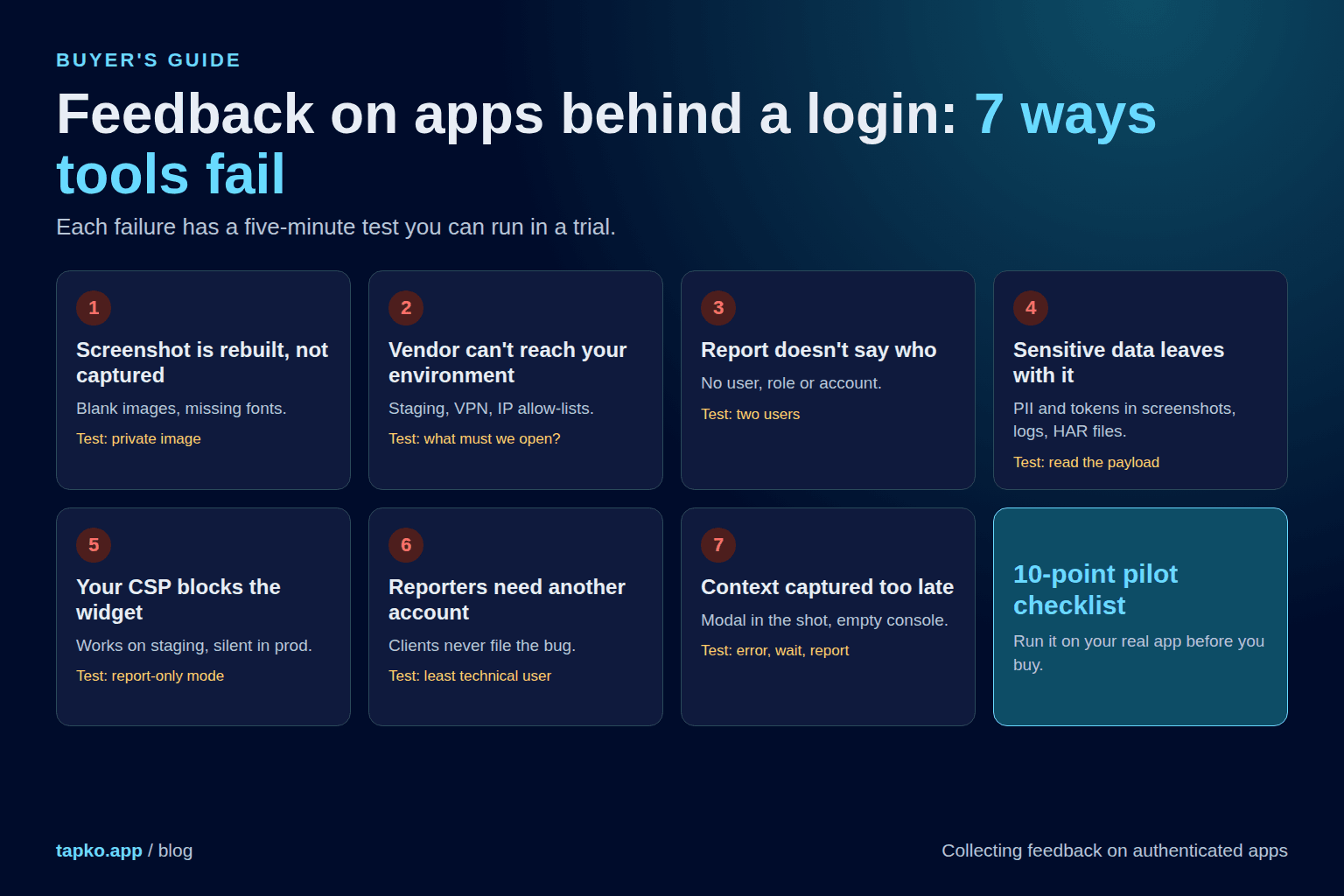
- Seven failure modes cover most of it. Each has a test that takes minutes.
- Pick by reporter first, tool second. Clients on staging, your QA team and paying customers need different things.
- Run the 10-point pilot checklist on your real app before you buy. Skip the demo site.
Feedback tools are usually demoed on a public page: point at a button, leave a comment, done. Put the same tool on an app behind a login and things break in ways the demo never showed. I suspect that is the part most trials skip. This guide is for two readers: agencies whose clients review staging builds behind a password, and product teams collecting bugs from signed-in users.
Why the tool choice matters more than it looks
A public page is the same for everyone. An authenticated app is not. What the reporter sees depends on who they are, what their role allows and what data their account holds. That changes what a good report is, and it raises the cost of picking the wrong tool.
Reproduction depends on identity
“The button is broken” means nothing without the role, account and data state behind it.
Capture depends on access
Anything that loads content from outside the user's session can miss what the user saw.
Reports are data exports
Every screenshot, log and network trace is a copy of private data, stored somewhere else.
Switching is expensive
Once the widget is in production and tickets are wired to your board, you won't swap it casually.
The failures also arrive late. A trial on a public demo page passes. The problems show up on the first real staging build or the first customer session, after you've paid.
How most feedback tools fail behind a login
Here are seven. Each has the symptom you'll see, the usual cause and a quick test. Vendor details come from public documentation as of September 2026, so confirm specifics before you buy.
The screenshot is rebuilt, not captured
Symptom: Blank images and missing fonts in the report.
Cause: Widgets that use a library like html2canvas rebuild the page from the DOM rather than photographing it, and its own docs say cross-origin content needs a proxy. Tools that render on their own servers hit a different wall: Marker.io documents that its servers can't reach a site behind a login, so images, fonts or CSS go missing until you configure credentials or its authenticated media capture. The screen-recording route avoids this but makes the reporter pick a tab or screen in a browser prompt.
Test it: Report a bug on a page that shows a private, signed-URL image. Open the report. Is the image there?
The vendor cannot reach your private environment
Symptom: Reports fail or screenshots are empty on staging, VPN or internal hosts.
Cause: Server-side rendering means the vendor's servers must load your page. Marker.io publishes static IP addresses you must allow-list for private sites. That is a ticket to your infrastructure team, not a setting.
Test it: Ask the vendor: does anything render or fetch from your servers? If yes, what must we open?
Reports don't say who filed them
Symptom: Every report arrives as an anonymous visitor. Developers cannot tell which account, role or plan hit the bug.
Cause: Anonymous capture is fine for a marketing site. In an app, bugs depend on permissions and data. Tools that support it need you to pass identity in. Userback, for example, has an identify() call for logged-in users and a troubleshooting article for reports that show up as “Someone”. Check which plan includes the identity feature before you commit.
Test it: Submit a report as two different users. Can you tell them apart, with role and account, without asking?
Sensitive data leaves the app with every report
Symptom: Customer names, emails and tokens end up in screenshots, console logs and tickets that a whole team can read.
Cause: A screenshot of a logged-in app is a screenshot of someone's data. Network archives are worse. In 2023, attackers who got into Okta's support system found HAR files uploaded by customers that contained session tokens, and used them to hijack the sessions of 5 customers. The entry point was a leaked service account, but the tokens in the files are what made the damage possible. Masking has to happen before the capture, in the browser, not after upload.
Test it: Open DevTools, submit a report, read the payload. Is anything in it you would not paste into a public ticket?
Your own security headers block the widget
Symptom: The widget never appears in production, though it worked on staging.
Cause: Apps with a Content Security Policy refuse scripts and connections from domains they haven't allowed. Vendors document this, for example Sleekplan and Marker.io, and the fix usually touches several directives (script, connect, image, style), not one.
Test it: Load the widget on the production build with your real CSP in report-only mode. Read the violations.
Reporters need yet another account
Symptom: The people who see the bugs (clients, customers, sales) never file them.
Cause: Some tools want the reporter to install an extension and sign in. BugHerd's extension covers Chrome, Edge, Firefox and Safari, and its guests can comment through a shared link without an account. Marker.io's extension route requires signed-in Marker.io users. Same category, very different reporter experience.
Test it: Give the tool to the least technical person who will report. Time how long until their first report is submitted.
Context is captured at the wrong moment
Symptom: The screenshot shows the report form. The console log is empty. The bug is gone.
Cause: Two bugs that show up in the wild: the screenshot is taken after the report modal opens, so the modal covers the page, and console errors are only recorded once the form opens, after the error already happened.
Test it: Trigger a console error, wait a minute, then report. Is the error in the report?
Pick by reporter first, tool second
Start from who files the report and how they sign in.
| Who reports | How the app is gated | What to require |
|---|---|---|
| Clients reviewing a staging build | HTTP basic auth or a shared staging password | No-account reviewer flow. Confirm screenshots work behind the password. |
| Clients or stakeholders on a live, logged-in web app | Real user login (SSO, cookies) | Embedded widget with no reporter account. Check private assets render. |
| Your own QA and dev team | Login, roles, test accounts | Extension or widget with identity and console/network capture. |
| Paying customers inside your product | Login, multi-tenant data | Embedded widget with user identity passed in and masking on by default. |
| Regulated or internal app | VPN, IP restrictions, strict CSP | Client-side capture only. No vendor-side rendering that needs inbound access. |
If you are an agency
Your reporter is a client who will not install an extension or learn a new portal. The staging password is already a hurdle. Prioritize a no-account reviewer flow and screenshots that survive basic auth. Identity matters less, since the client is the client. See how this works across a website build and how to collect client feedback without email threads.
If you run a SaaS product
Your reporters are users inside a multi-tenant app. Prioritize identity (user, account, plan), default-on masking and an honest answer on where data is stored. Client-side capture beats vendor-side rendering, because you can control what leaves the browser.
A snapshot of the tools
This is not a ranking. It shows how a few tools handle the three questions that matter behind a login. For price and general fit, read best bug reporting tools for agencies. Cells marked “Verify” are things we could not confirm from public documentation.
| Tool | Reporter access | Behind a login | Identity and masking |
|---|---|---|---|
| tapko.app | One script tag. Clients comment on the live page with no account. | Works on staging and password-protected sites, per its own docs. | Verify: run the checklist below before you rely on it for per-user identity or masking. |
| Marker.io | Widget or browser extension. Extension users must be signed in. | Basic auth setup, authenticated media capture for cookie-based logins, IP allow-list for private sites. | Data masking documented as a feature. Verify depth on your data. |
| BugHerd | Extension or JS snippet. Guests comment via a shared link. | Documented to work on password-protected and staging sites. | Verify: the task board is built around members and guests, not end-user identity. |
| Userback | JS SDK. Aimed at feedback from a product's own users. | Verify behavior on your login flow during a trial. | identify() with custom fields such as plan and account ID. |
A note on where tapko.app fits. It is built for the agency case: a client opens the live or staging site, clicks the problem and comments, with no account and one script tag. If you need per-user identity inside a multi-tenant product, or strict masking rules, run the checklist below against it and against every other tool. Head-to-heads: vs Marker.io and vs BugHerd.
The 10-point pilot checklist
Run this on your real app, on a real staging build, with real roles. It takes an afternoon. A tool that fails any of the first six is a poor fit for an authenticated app, however good the demo looked.
- Report a bug on a page with private images. The screenshot shows them.
- Report from two roles (admin, member). The report shows who and which role.
- Report from a staging or VPN host. Nothing requires the vendor to reach inward.
- Open DevTools and read the submitted payload. No tokens, no passwords, no data you would not paste in a public ticket.
- Mark a field as sensitive. It is masked in the screenshot before capture.
- Load it under your real CSP in report-only mode. No violations you cannot fix.
- Trigger an error, wait, then report. The console error is in the report.
- Hand it to your least technical reporter. First report in under two minutes, no help.
- The report lands as a task in the tool your team already works in.
- Ask where data is stored, how long, and how to delete it. Get the answer in writing.
What to do this week
- Name your reporter. Client, QA, or customer. One answer per project.
- List your gates. Basic auth, SSO, VPN, CSP. Each is a place a tool can fail.
- Trial two tools with the checklist. On your app, not theirs.
Frequently asked questions
Why do feedback tools struggle with apps behind a login?
Many tools rebuild a screenshot from the page or render it on their own servers. Either way they can fail to reach images, fonts and styles that only load for a signed-in user, so the screenshot comes back incomplete. They also tend to know nothing about who the reporter is or which account they belong to.
Do reporters need an account with the feedback tool?
It depends on the tool. Some require reporters to install a browser extension and sign in. Others let reviewers leave feedback through a shared link or an embedded widget with no account. For client review this decides whether feedback actually arrives.
Is it safe to capture screenshots and logs from a logged-in app?
Only if sensitive data is masked before it leaves the browser and you control what is captured. Screenshots, console logs and network archives can contain personal data and session tokens. In 2023, attackers who accessed Okta's support system used session tokens found in uploaded HAR files to hijack the sessions of 5 customers.
What should a bug report from an authenticated app include?
Everything a normal report has (screenshot, URL, browser, device, viewport) plus who reported it: user or account ID, role or plan, and the state of the app. Without identity, a developer cannot reproduce anything that depends on permissions or data.
Can I use a script-based widget if my app sets a Content Security Policy?
Yes, but you have to allow the widget's domains in the relevant CSP directives (script, connect, image and style sources). Test in report-only mode first so you can see what would be blocked before you enforce anything.
Sources
Vendor documentation and public write-ups reviewed on September 29, 2026. Features and plans change, so check current docs before you buy.
- Marker.io: capture behind-login and SSO content
- Marker.io: browser extension FAQs
- Marker.io: basic authentication
- Marker.io: firewalls and secure networks
- Marker.io: data masking
- Marker.io: Content Security Policy
- BugHerd: browser extensions
- Userback: user identification
- Sleekplan: widget with a Content Security Policy
- Okta: root cause of the 2023 support system breach
- html2canvas README
- W3C Screen Capture issue 145: capture screenshot of DOM