
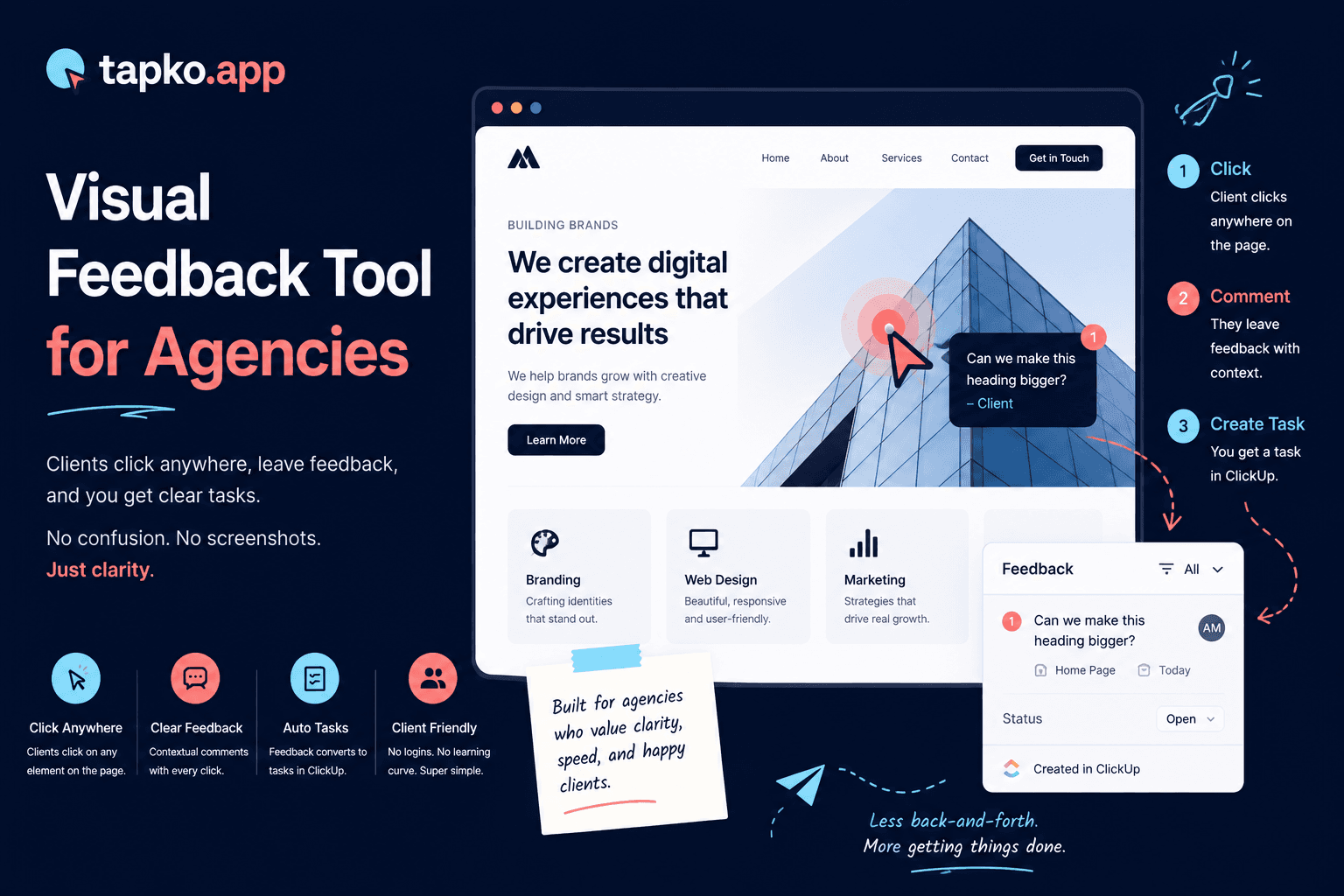
A visual feedback tool lets your clients point at something on your website and leave a comment — instead of trying to describe it in words over email. The screenshot, the URL, the browser, and the device are captured automatically. Your team sees exactly what the client saw, without the guessing game.
If you are evaluating visual feedback tools for your agency, here is what actually matters — and what is just marketing noise.
What a visual feedback tool does
Traditional feedback process: client sees an issue → opens email → tries to describe it → attaches a blurry screenshot → sends. Your team reads the email, asks follow-up questions, waits for a reply, and eventually figures out what the client meant.
Visual feedback process: client sees an issue → clicks on it → types a sentence → done. Your team sees the issue pinned to the exact element on the live page, with a screenshot, the URL, the browser version, the operating system, and the viewport dimensions attached automatically.
The difference in speed and accuracy is significant. More importantly, the difference in how much feedback actually gets submitted is significant. When reporting is frictionless, clients report the things they would normally just ignore.
The feature that matters most: client setup time
Every visual feedback tool captures screenshots and context. The real differentiator is how much setup it requires from the client before they can leave their first comment.
Some tools require the client to install a browser extension. Some require account creation. Some require both. Each step reduces the percentage of clients who actually complete the setup — and every client who drops off during setup is a client who goes back to emailing you vague descriptions.
The best tools require zero client setup. The client opens a URL, sees your site with a feedback layer on top, and clicks to comment. No extension, no account, no tutorial.
What to evaluate when choosing a visual feedback tool
Client experience
Can clients leave feedback with zero setup? Do they need an account, extension, or any prior knowledge of the tool?
Automatic context capture
Does the tool automatically capture URL, device, browser, OS, and viewport — or do clients have to include this manually?
Integration depth
Does feedback flow directly into your project management tool (ClickUp, Jira, Asana), or do you have to manually copy-paste it?
Pricing per project
Is pricing per seat or per project? Most agencies have more projects than they have team members — per-project pricing can get expensive fast.
Browser extension vs. script tag: why it matters
Many visual feedback tools deliver their client-side experience through a browser extension. The advantage: no code changes required on the site. The disadvantage: every client needs to install it before they can leave feedback.
Script-tag tools are embedded directly in the site during review. The client opens a URL and the feedback layer is already there — no install. The setup is done once by the developer, not repeatedly by every client.
For agencies, script-tag tools win on client adoption. A client who sees a feedback button on the site they are already reviewing is far more likely to use it than a client who has to find, install, and activate a browser extension first.
Red flags to watch for
Required client accounts. If clients need to create an account, expect a meaningful percentage to drop off. The best tools are account-free for the feedback reporter.
Per-seat pricing that does not include clients. Some tools charge per seat and then charge again for guest reporters. Read the pricing carefully.
Screenshot tools that do not capture device context. A screenshot alone is not enough. You need to know whether the issue was on desktop or mobile, which browser, which OS. Tools that only capture screenshots and not the surrounding metadata are less useful than they appear.
What per-seat pricing costs a growing agency
Per-seat and per-project pricing sounds small until you add a fifth client or a third teammate. Move the sliders below to see what your actual agency size would pay across the tools agencies compare most.
The bottom line
The best visual feedback tool is the one your clients actually use. All the features in the world do not matter if your clients find the tool confusing and go back to email.
Start with zero client setup as a non-negotiable. Automatic context capture as a baseline requirement. Then evaluate integrations, pricing, and workflow fit. In that order.
Frequently Asked Questions
What is a visual feedback tool?
A visual feedback tool lets a client click on something on a live website and leave a comment, instead of describing it over email. The screenshot, URL, browser, and device are captured automatically.
What is the most important feature to look for in a visual feedback tool?
How much setup it requires from the client before their first comment. Tools that require a browser extension or an account lose a meaningful percentage of clients at that step. The best tools require zero client setup.
Is a script-tag feedback tool better than a browser extension?
For client adoption, yes. A script-tag tool is embedded once by the developer, so the client just opens a URL and the feedback layer is already there. A browser extension requires every client to find, install, and activate it first.
What are red flags when evaluating a visual feedback tool?
Required client accounts, per-seat pricing that charges extra for guest reporters, and screenshot capture without surrounding metadata like device, browser, and OS.